
GGR274 Week 1: Computation, Python, and JupyterHub#
Karen Reid - with credit to David Liu and Ilya Musabirov
What is programming?#
A computer program is a set of instructions for a computer to execute. Just as humans have languages like English to communicate with each other, a programming language is a language that allows humans to communicate these instructions to a computer. You can think of Python code as a sequence of very precise instructions that your computer can understand.
How many of you have some programming experience?
Python!#
In this course, we’ll be using the Python programming language.
Why Python?#
Python is…
beginner friendly (code looks a lot like English)
lots of built-in functionality
powerful data science and data visualization libraries (e.g.
numpy,pandas,plotly)very commonly used in both academia and industr
Writing Python code#
We are going to start right now to learn to learn some of the basics of Python programming!
Notebooks!#
Often, Python code is written in .py files, called Python modules, where all the .py file contains is code (and comments).
In this course, we’ll use Jupyter notebooks to write Python code.
Notebooks let us mix:
Python code
Output of running the code
Text (including nice formatting)
Images
…and more!
This isn’t just for education purposes, although it does make your life easier as a novice programmer. Jupyter notebooks were actually developed as a way for scientists to show their thought processes as they were analyzing data. By including the code together with the tables and graphs they produce, scientists have a way to describe and present their work in a way that they can incrementally change, and in a way that others can see all the intermediate steps.
Fun fact: Jupyter, the software that lets us create notebooks, is written in Python!

Do I need to download and install Python and Jupyter?#

No software installation required!#
In this course, we’ll be using JupyterHub (https://jupyter.utoronto.ca), which runs Python and Jupyter for us online.
You can login to JupyterHub from anywhere with an Internet collection
All of your files are stored “in the cloud”
Runs Python code “in the cloud”
JupyterHub Demo!#
Two ways of accessing JupyterHub:
Go to any notebook on our course website (https://uoftcompdsci.github.io/ggr274-20261/) and click on the little rocket icon:

Learning to Program. Some things to remember#
Computer programming languages are actually for people, not for computers :)
To some extent, learning a new programming language is quite like learning a new (written) human language, but … easier
Vocabulary is much, much smaller
Syntax/Grammar are much simpler (but also strictly enforced)
The main limitation is that the computer (of pre-GPT era) is much more limited in understanding and thus more strict
The real barrier is understanding what you want to do and explaining that in a clear non self-contradictory way
In addition to writing code, you should also be learning to read code. Reading code effectively is even more crucial than writing code
Data Science tasks rarely start from a blank page
You use, assimilate, and adapt the code and ideas of others including AI tools
Quite often, you are in a “menu in an exotic restaurant” situation, and that’s okay!
Introduction to Python#
Learning objectives#
In the rest of this lecture, you will learn to:
Identify and describe values of different types in Python code
Perform simple computations on these values
Store values and the results of computations in variables
Run Python code and display results in a Jupyter notebook (like this one!)
Representing Data in Python: numbers#
Python can represent both integer and fractional numbers by writing them the same way you would in text:
3
-3.5
int and float#
Python defines two data types to categorize numbers: int and float.
An int represents an integer like 3 or -4.
A float, short for floating point number, represents a fractional number like 3.5 or -4.5.
Arithmetic in Python#
We can combine numbers using basic arithmetic operations like +, -, *, and /:
10 + 20
10 - 20
10 * 20
10 / 20
((10 + 20) * (5 - 2)) / 3.5
Exercise 1#
Suppose you go out to eat at a restaurant, and your before-tax total is $15.99.
Assuming there is a 13% tax and 15% tip (on the before-tax price), use Python to calculate the total amount that you pay.
# Write your Python code in the space below
Rounding and the round function#
Python provides functions, which are named blocks of code that perform a specific computation.
The round function lets us round floats to a specific number of decimal places.
round(3.6789, 2)
Function terminology#
The expression round(3.6789, 2) is called a function call.
roundis the name of the function3.6789and2are the inputs/arguments of the functionThe value
3.68is the output/return value of the function
Here are two other examples of Python functions:
abs(-4.3)
type(-4.3)
Variables#
As our code gets more complex, we’ll use variables to keep track of our values.
A variable is a piece of code that refers to a value.
We create variables using code called an assignment statement, which looks like:
<variable> = <expression>
Jupyter notebooks let us write multiple statements in a single code cell. This lets us write one block of code where we define variables and use them in the same cell.
amount = 15.99
tax_rate = 0.13
tip_rate = 0.15

total_amount = amount * (1 + tax_rate + tip_rate)

round(total_amount, 2)
Naming variables#
Even though Python lets us name variables whatever we want, it is important to pick meaningful variable names!
If you don’t, you might end up reading code that looks like this:
lol = 15.99
lmao = 0.13
x = 0.15

wtf = lol * (1 + lmao + x)

round(wtf)
Python follows two conventions for writing variable names:
make all letters lowercase (so
amount, notAmountorAMOUNT)separate words with underscores so (
tax_rate, nottax rateortaxrate)
Comparisons and the bool data type#
We can compare numbers using the following comparison operators:
Operation |
Description |
|---|---|
|
Are |
|
Are |
|
Is |
|
Is |
|
Is |
|
Is |
3 == 3
10 * 2 <= 3 * 6
Python displays True and False as a result of a comparison.
True and False are the two values of the bool data type, short for boolean.
Boolean values represent answers to Yes/No questions like:
Is this person a Canadian citizen?
Is this movie less than 2 hours long?
Is every student in this lecture paying attention right now?
Manipulating booleans#
We can perform three operations on booleans: not, and, or.
not b negates the value of b, so True becomes False and vice versa.
not True
a and b produces whether both a and b are True:
True and False
a or b evaluates to whether at least one of a and b are True:
True or False
(5 < 10) and (3 * 5 < 2 * 7)
Text data and the str data type#
str, short for string, is a type of data for representing text.
A string is a sequence of characters, where each character could be:
English letters (a, b, c)
numeric digits (0, 1, 2, etc.)
letters and glyphs from languages other than English (e.g., ي, ξ, 你)
punctuation marks and symbols (such as the period (.) and at symbol @)
spaces
emojis (e.g., 😉, 🐧, 🏫)
In Python, we write strings by writing text surrounded by either single-quotes or double-quotes.
'Hello, world!'
"Dark chocolate is the best."
We can check whether two strings are equal:
"chocolate" == "chocolate"
This comparison is case-sensitive:
"Hello" == "hello"
We can concatenate strings together using the + operator:
"Hello" + "World!"
"Hello " + "World!"
Finally, we can use the len() function to compute the number of characters of a string:
len("Hello World!")
Exercise 2#
Write a Python expression to compute whether the name "Karen Reid" is longer than "Alex Ramiller".
(The word “whether” signals that the output should be a boolean, i.e., either True or False.)
# Write your code in the space below
f-strings#
Suppose have have a student’s name and a course’ code, and want to compute a welcome message like "Hello Karen, you are currently in GGR274!"
name = "Karen"
course = "GGR274"

welcome_message = "Hello " + name + ", you are currently in " + course + "!"
welcome_message
This is a bit ugly, so Python gives us a way of writing a string with single-/double-quotes, but marking certain parts as Python expressions that should be evaluated to build the string.
These are called f-strings (short for “formatted string literal”).
welcome_message2 = f"Hello {name}, you are currently in {course}!"
welcome_message2
Learning in general#
Why learning is difficult?#
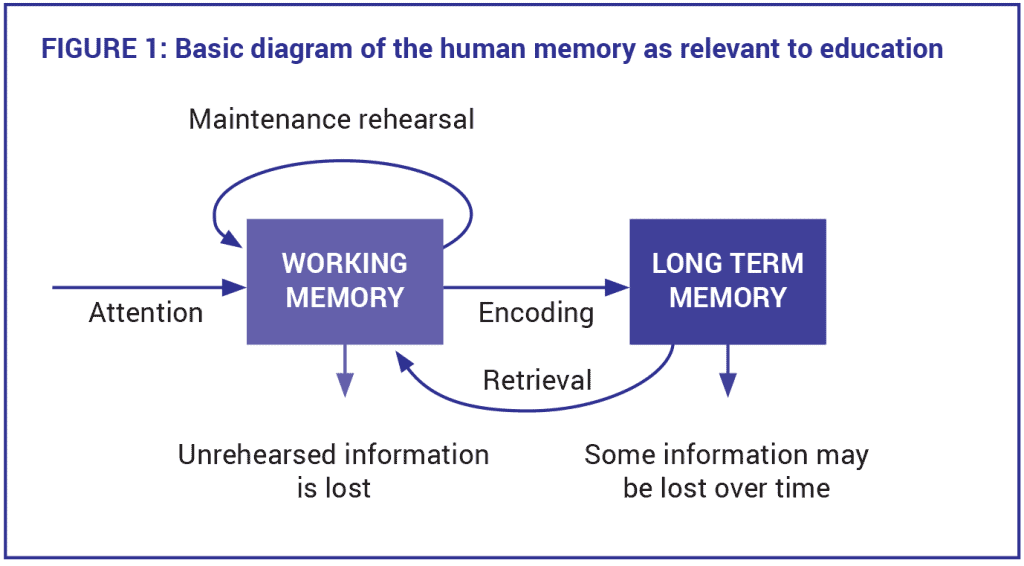
Some Active (Self-)Learning Strategies#
Activating Prior Knowledge
Distributing Practice (not cramming!) and Interleaving (not creating interruptions!)
Elaborative rehearsal: rephrasing, finding examples, integrating with other constructs, organizing in a meaningful way
From strategies to tactics#
Reading your own code and the code of others, highlight and annotate it (notebooks are perfect for that)
Use markdown blocks to write down topic sentences and paragraphs,
Always assume you will need to reread your code and that you will you remember nothing
Dealing with the complex blocks of code you don’t understand just yet, try to write down high-level explanations in plain language
what does it do?
what does it take as an input and produce as an output?
Distributed practice and elaborative rehearsal:
Read the lab and homework at the beginning of the week. If you have time, make comments
Look at the previous homework to find useful chunks
Regularly repeat main commands, functions, and constructs in context
For example, modify a bit chunks from previous homework (What if I change 5 to 6, a number to a character, add another variable?)
Make notes on connections between terminology and Python syntax, between different ways of writing the same code